Blog
Lee las últimas noticias de la plantilla para aplicaciones SaaS con Remix.
How to require approval before production deploys in GitHub Actions
- Nombre
- ApproveGate Team
#github actions#deploy approvals#soc 2#change management
In GitHub Actions, create a production environment with required reviewers and Prevent self-review; set environment: production on the deploy job. GitHub pauses the job until a reviewer approves. That approves a workflow run, not a build. To prove what shipped, bind approval to one commit and ship that commit's build.
Who this is for: engineering and platform leads on GitHub Actions who want a human gate before production, especially teams heading into a SOC 2 Type II audit.
Approvegate produces evidence. Your auditor decides whether a control is met.
How do you require approval before a production deploy in GitHub Actions?
Use a GitHub environment with required reviewers. Any job that references the environment waits until one of the listed reviewers approves it, and only then gets the environment's secrets.
Check your plan first. Per the GitHub Docs environments reference, required reviewers work on public repos on every plan. On private or internal repos they need GitHub Enterprise, even though Pro and Team can create environments there.
Set up the environment once, in the repository settings (GitHub Docs: managing environments):
- Go to Settings → Environments → New environment and name it
production. - Under deployment protection rules, check Required reviewers and add up to 6 users or teams. Any one of them can approve.
- Check Prevent self-review.
- Leave Allow administrators to bypass configured protection rules unchecked.
- Under Deployment branches and tags, restrict deploys to
mainor your release tag pattern. - Click Save protection rules.
- Move production credentials into the environment's secrets, not repository secrets.
Then point the deploy job at the environment. Build once, upload the output, and deploy that exact output instead of checking out and building again:
name: deploy

on:
  push:
    branches: [main]

jobs:
  build:
    runs-on: ubuntu-latest
    steps:
      - uses: actions/checkout@v4
      - run: make build          # your build; writes ./dist
      - uses: actions/upload-artifact@v4
        with:
          name: app-${{ github.sha }}
          path: dist/

  deploy:
    needs: build
    runs-on: ubuntu-latest
    environment: production
    concurrency: production
    steps:
      - uses: actions/download-artifact@v4
        with:
          name: app-${{ github.sha }}
          path: dist/
      - name: Deploy
        run: echo "Deploy ./dist to production here"   # replace with your deploy command
        env:
          DEPLOY_TOKEN: ${{ secrets.DEPLOY_TOKEN }}
When deploy starts, it pauses. A reviewer opens the run, clicks Review deployments, selects production, optionally adds a comment and clicks Approve and deploy (GitHub Docs: reviewing deployments). If they reject it, the workflow fails. DEPLOY_TOKEN isn't available to the job until the approval goes through.
Which settings make the approval hold up?
A required reviewer only helps if nothing can deploy around it. These five settings close the common gaps:
| Setting | Where | What it prevents |
|---|---|---|
| Prevent self-review | Environment protection rules | The person who triggered the run approving their own deploy |
| Admin bypass off | Environment: uncheck "Allow administrators to bypass configured protection rules" | An admin starting a waiting deploy without a review |
| Deployment branches and tags | Environment: main or release tags only |
A workflow on a feature branch deploying to production |
| Production secrets and cloud role scoped to the environment | Environment secrets; your cloud's OpenID Connect (OIDC) trust policy | Any workflow or person deploying with credentials that never pass through the environment |
concurrency: production |
Workflow YAML (GitHub Docs: deploying with GitHub Actions) | Two approved releases deploying over each other |
Prevent self-review blocks whoever triggered the run, even if they're a listed reviewer. On a push to main, that's usually whoever merged. If someone else merged your PR, you, the author, can still approve the deploy. For small teams where that matters, see "separation of duties in CI/CD for teams under 20 engineers".
Scoping production secrets and the cloud role to the environment matters most. Pushing a change to workflow YAML can't turn protection rules off; changing them needs admin access to the repo (or ownership, for a personal repo). The real bypass is a workflow that deploys without referencing the environment, or production credentials that work outside it. Scope the cloud role so it only trusts tokens issued for the production environment.
What did the reviewer actually approve?
A GitHub environment approval isn't a deploy approval. The reviewer approves a job in a workflow run. Nothing in that click records which build, artifact or SHA reaches production.
The run has a commit SHA, but that's the commit that triggered the workflow. What the deploy step ships depends on your YAML. Say your deploy job checks out ref: main and builds again, or pulls :latest from your registry:
10:02  Run for commit a1c4 starts; deploy job waits for review
10:05  Commit e7b2 merges to main; CI pushes it as :latest
10:20  Reviewer clicks "Approve and deploy" on the 10:02 run
10:21  Deploy job pulls :latest and ships e7b2
The run log says the 10:02 run was approved. It doesn't say e7b2 went out, and e7b2 was never approved for production. The YAML did what it was written to do.
The fix for this timeline is in your YAML, and Approvegate can't make it for you: build once, deploy that artifact, and never rebuild from main or pull :latest in the deploy job. Approvegate's check sees the run's commit (GITHUB_SHA), not what the deploy step downloads.
It depends on what you need:
- You need a human pause before prod. Native environments are fine. Build once and deploy the uploaded artifact, and you've closed most of the practical gap.
- You have to show an auditor that the approved change is the deployed change. Convention isn't proof. You'll typically need an approval record tied to one commit and checked at deploy time, on top of the build-once rule.
How do you tie the approval to the build that ships?
Bind the approval to one commit SHA, check it right before the deploy, and deploy only the artifact built from that commit. The Approvegate action does the first two. The third is your pipeline's job.
In Approvegate, an approval is a record: a release request with a change ticket and a valid-until time, approved by someone other than the requester when you turn on an Enforcing separation-of-duties policy, and bound to one commit SHA.
Add one step as the first step of the deploy job, before you download the artifact. The action checks out the repo itself, which clears the workspace:
- uses: ApproveGate/[email protected]
  with:
    service: payments-api
    release: v2.14.3
    environment: production
  env:
    APPROVEGATE_TOKEN: ${{ secrets.APPROVEGATE_TOKEN }}
On a tag push you can drop release: it's derived from the tag. On a branch push without release, the check runs against a branch approval, which records the SHA but doesn't bind it, so pass release if you want binding. environment falls back to the job's environment: name. Outside GitHub Actions, the same check runs as GITHUB_SHA=<commit> check.sh --service ... --release ... --environment .... Set GITHUB_SHA to the commit you're deploying, or nothing gets bound.
How the binding works:
- An approver approves a release request (a service and a release), not a SHA.
- The first deploy check that passes for that approval binds it to the run's commit SHA (
GITHUB_SHA) and prints it. Whatever commit that first deploy runs from is the one that gets bound. - Any later check with a different SHA returns
ARTIFACT_MISMATCHand, in enforce mode, the job fails.
The action doesn't look inside your artifact. The binding proves which commit the approved deploy ran from. It proves what shipped only if the deploy ships the artifact built from that commit.
Real output from a test tenant (placeholder emails, test SHAs, configuration lines trimmed). First check for v2.14.3:
$ GITHUB_SHA=9f2a1c7… check.sh --service payments-api --release v2.14.3 --environment production
Approvegate: deploy allowed for [email protected] in production. Approved. Artifact 9f2a1c7e4b8d03a6f51c2e9d7b4a80c3e6f1c17b bound to this approval.

  artifact   9f2a1c7e4b8d…6f1c17b
  request    payments-api v2.14.3 · CHG-1042
  approval   APPROVED by [email protected]
  sod        satisfied · john.doe ≠ admin
  window     valid until 2026-10-14 17:31 UTC
  freeze     none active

ALLOW
Same release, a different commit:
$ GITHUB_SHA=4be1c90… check.sh --service payments-api --release v2.14.3 --environment production
Approvegate: deploy blocked for [email protected] in production: Artifact mismatch: approval is bound to 9f2a1c7e4b8d03a6f51c2e9d7b4a80c3e6f1c17b, got 4be1c90a7d2f6e8b13c5a9f0d4e72b6c8a1f92d0.

  artifact   4be1c90a7d2f…a1f92d0
  request    payments-api v2.14.3 · CHG-1042
  approval   APPROVED by [email protected]
  sod        satisfied · john.doe ≠ admin
  window     valid until 2026-10-14 17:31 UTC
  freeze     none active

BLOCK
The artifact being deployed does not match the SHA bound to the approval.
exit 1 · pipeline stopped
A release nobody has approved yet stops the same way: BLOCK, "v2.15.0 has not been approved for production deployment."
sod is separation of duties: with the tenant policy in Enforcing mode, the requester can't approve their own request.
window is the approval's "valid until"; approvals can also be revoked. freeze blocks deploys during a freeze window. The same block goes to the GitHub step summary.
Rolling it out without blocking anyone
Shadow mode records the real verdict but lets the deploy through. Here's an unapproved release, v2.15.0, with the service in shadow mode:
Approvegate: deploy allowed for [email protected] in production. [Shadow mode — not enforced] Approval for v2.15.0 is pending approval.

  artifact   4be1c90a7d2f…a1f92d0
  request    payments-api v2.15.0 · CHG-1051
  approval   PENDING · awaiting approval
  sod        not enforced
  window     valid until 2026-10-14 17:31 UTC
  freeze     none active

ALLOW
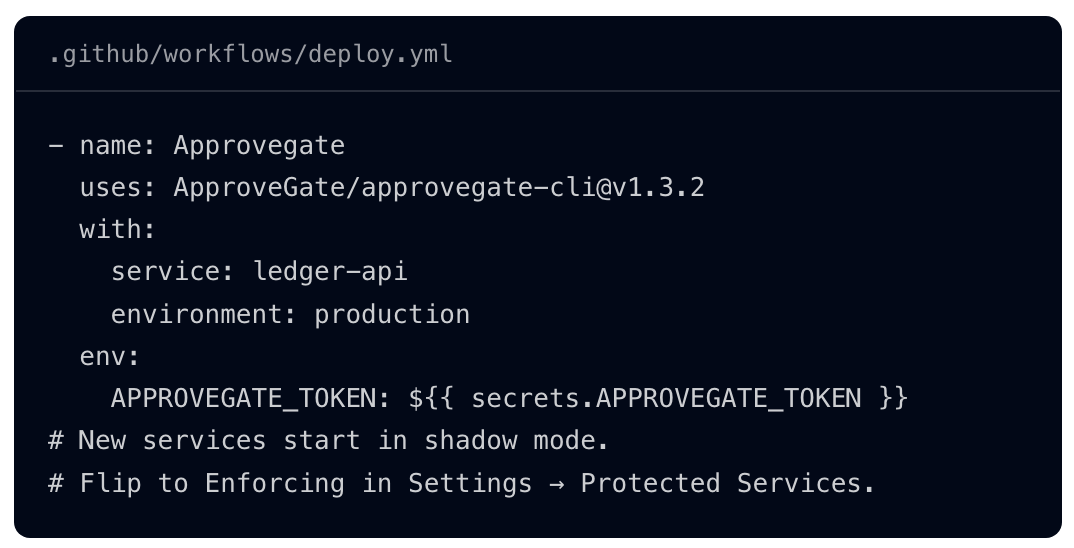
The dashboard counts allows and would-have-blocked checks, so you can see what enforcement would have stopped before it stops anything. Switching a service to enforce is one action. Switching back to shadow requires a reason, which goes into the audit log.
Isn't a pull request approval enough?
No. A pull request review approves code. Merging to main isn't a deploy approval, even when main deploys automatically: it says the code was reviewed, not that anyone decided this build should go to production now. For each sampled change, auditors often ask for the PR review and a separate deploy approval, and some trace it to the SHA that shipped.
More in "why a PR approval isn't a deploy approval".
What if your GitHub plan doesn't include required reviewers?
Without required reviewers you have three options. Custom deployment protection rules don't help: on GitHub Free, GitHub Pro and GitHub Team they're also limited to public repos.
| Option | How approval works | Tradeoffs |
|---|---|---|
trstringer/manual-approval |
The workflow opens an issue; approvers comment "approve" or "deny" | The paused job holds a runner, uses minutes while it waits and fails after 6 hours on GitHub-hosted runners. The record is an issue comment. No binding to the build. |
| PR to a deploy branch | Merging the PR is the approval | The build runs again after the merge, so what was approved and what ships are different builds. It's still a PR approval. |
| External check step | A step asks an approval service and fails the job if there's no valid approval | No mid-run pause: the job fails and you re-run it after approval. You depend on that service. Approvegate is one; your own API is another. |
What happens for a 2am hotfix, or if the approval service is down?
Decide this before the incident. With native environments, an admin can bypass protection rules only if you've allowed it. With Approvegate, you can force through with a recorded reason, and you choose what happens if Approvegate is unreachable.
Native. If admin bypass is allowed, an admin clicks Start all waiting jobs, adds a comment and confirms with I understand the consequences, start deploying. If admin bypass is off, make sure more than one reviewer can be reached at 2am.
With Approvegate. Set force-approve and a reason. The deploy proceeds and is recorded as an override with the actor, SHA, run URL and reason. This needs Approvegate to be reachable:
- uses: ApproveGate/[email protected]
  with:
    service: payments-api
    release: v2.14.3
    environment: production
    force-approve: "true"
    reason: "Hotfix: checkout errors in production, approver unreachable"
  env:
    APPROVEGATE_TOKEN: ${{ secrets.APPROVEGATE_TOKEN }}
Keep this in a separate break-glass workflow, not in your normal deploy.
If Approvegate itself is down, on-unreachable decides. The default is fail: no answer, no deploy. With allow, after retries the deploy proceeds marked unverified=true, writes a job summary and uploads approvegate-unverified-deploy.json as an artifact so there's a record to review later:
- uses: ApproveGate/[email protected]
  with:
    service: payments-api
    release: v2.14.3
    environment: production
    on-unreachable: allow
  env:
    APPROVEGATE_TOKEN: ${{ secrets.APPROVEGATE_TOKEN }}
More in "break-glass deploys without breaking your audit trail".
What will a SOC 2 auditor ask to see?
Change management falls under CC8.1 in the AICPA's 2017 Trust Services Criteria. Auditors typically sample production deploys from the audit period and trace each one:
| Evidence | Natively in GitHub | In an Approvegate evidence package |
|---|---|---|
| Request and justification | The PR description, if anyone wrote one | Change request and justification |
| Approval | The environment approval on that run | Approver decisions |
| Approver isn't the requester | Prevent self-review covers whoever triggered the run, not necessarily the author | Separation of duties evaluation (approver vs. the change request's requester, when the SoD policy is on) |
| SHA that shipped | The run's triggering commit; that's what shipped only if you deployed that commit's build | The commit SHA bound at the first passing deploy check, same build-once caveat |
| Timestamp | Deployment history and the run log | Deploy checks and audit events |
| Exceptions | Admin bypass comments, if bypass is on | Overrides (actor, SHA, run URL, reason) in audit events |
Natively, you'll be pulling that trail together run by run. Check how far back your history goes and how you'll export it before the auditor asks.
Approvegate produces an evidence package per deploy, exported as JSON and PDF. Its sections cover the change request and justification, approver decisions, a separation of duties evaluation that provides evidence for CC5.1, traceability, deploy checks and audit events. A request can't be approved until its required fields are filled: by default, for non-emergency changes, a description, business justification, risk assessment, testing plan, ticket reference and PR URL.
Each package carries a SHA-256 contentHash of its canonicalized body. That's a hash, not a signature. Audit events are hash-chained per tenant.
You can also export the deploy population as CSV and import the auditor's sample list to pull the matching packages as one archive.
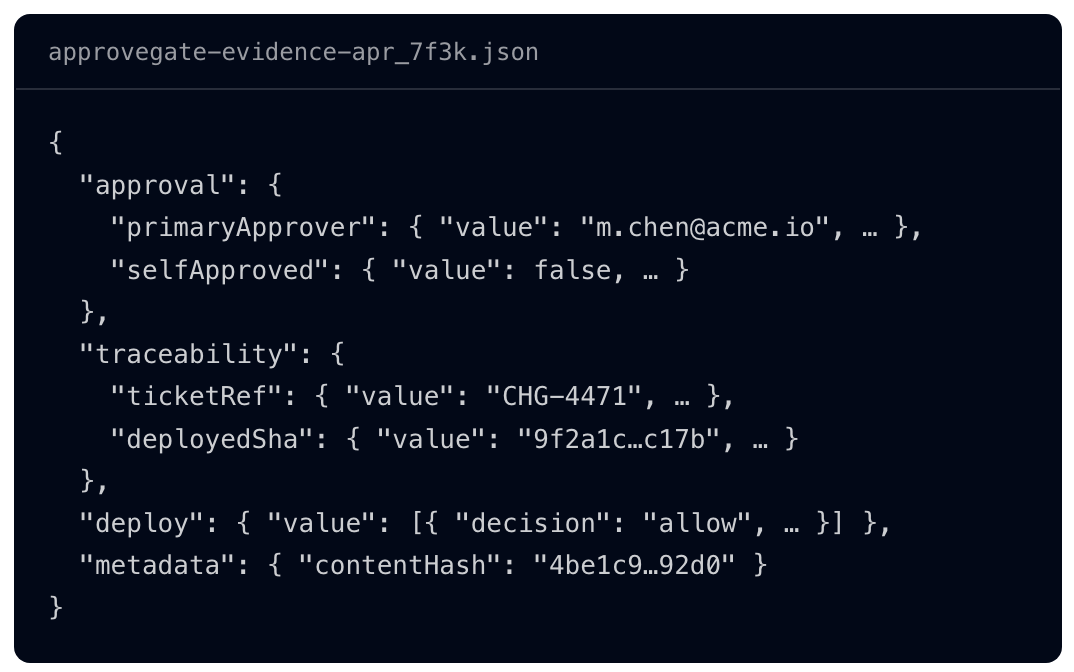
An excerpt of the format from approvegate.io, with illustrative values. Not a customer export.
For the full picture see "SOC 2 CC8.1 change management: what auditors ask for and how to produce it" and the "annotated sample deploy evidence package".
When are GitHub environments enough on their own?
If you have no audit coming and just want a pause before prod, native environments are enough: required reviewers, Prevent self-review, admin bypass off, and deploy the artifact you built.
For a fuller side-by-side, see "GitHub environment protection rules vs a deploy approval gate".
FAQ
What is the approval step in GitHub Actions? The approval step in GitHub Actions is a deployment protection rule called required reviewers, set on an environment. A job that references the environment pauses until one listed reviewer clicks Approve and deploy. That approves the job, not a specific build.
Can you require two approvals for a GitHub Actions deployment?
Not natively. You can list up to 6 reviewers, but one approval releases the job. trstringer/manual-approval has a minimum-approvals setting, and Approvegate approval workflows can set minimum approvers and required roles.
How long does a deployment wait for approval before it fails? A workflow can wait up to 30 days for environment approval (GitHub Docs: Actions limits). Don't confuse it with the wait timer, a separate delay you configure of 1 to 43,200 minutes, per the environments reference.
Does workflow_dispatch work as a manual approval?
No. workflow_dispatch lets someone start a workflow manually. It doesn't pause a run partway for someone else to approve. Use an environment with required reviewers for that.
Do GitHub environment required reviewers count as change approval for SOC 2? They're a record that someone approved a workflow run. If your auditor traces each sampled change to the SHA that was deployed, you'll also need to show that link. Ask your auditor how they test CC8.1.
Start free in shadow mode: add one step to one service and see what your pipeline would have blocked, without blocking anything. Start free
Last updated October 20, 2026 by CJ, founder of Approvegate.
